
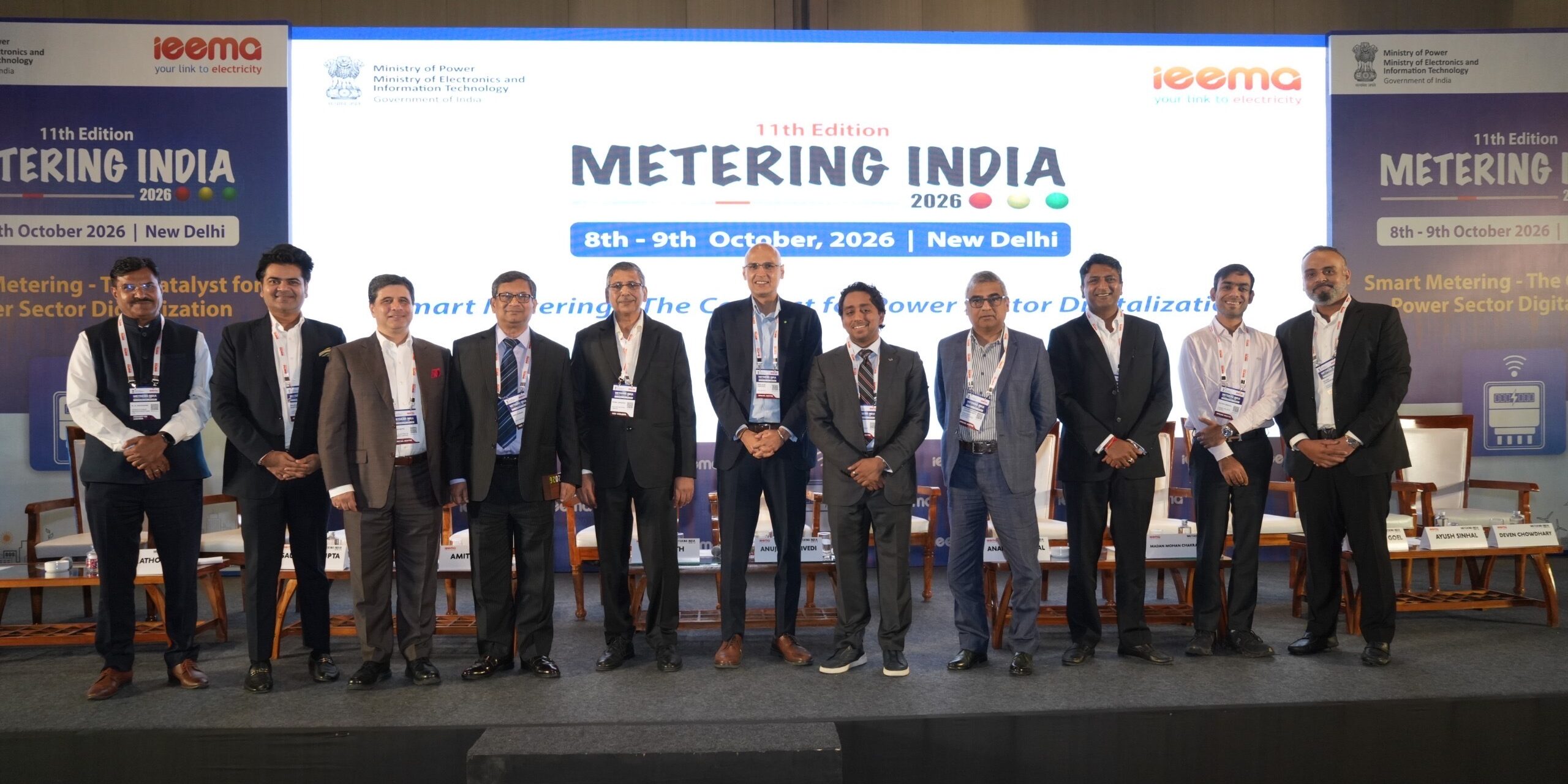
Kimbal Participates in Metering India 2026, Highlighting the Need to Strengthen India’s Smart Metering Ecosystem
Published on 13 October 2026




Overview
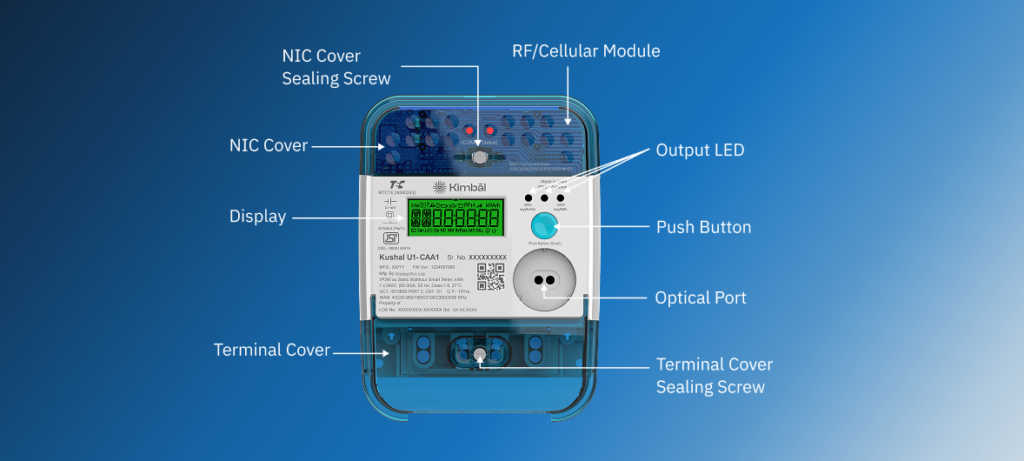
Your smart meter can tell you much more than how much electricity you have consumed. With a quick glance at the display, you can check your energy usage, monitor your prepaid balance, understand your home’s power consumption, and spot important alerts related to your electricity connection.
The best part is that reading a smart meter is simpler than most people think. The display presents key information through numbers, symbols, and indicators that help you understand how electricity is being used in your home or business.
In this guide, you’ll learn what each smart meter reading means, how to navigate the display screen, how to interpret common icons and alerts, and how to use this information to make smarter energy decisions. Whether you are a homeowner, a prepaid smart meter user, or someone who wants to understand electricity consumption better, this guide will help you read your smart meter with confidence.
By the end of this blog, you’ll know exactly what the numbers and symbols on your smart meter are telling you and how they can help you stay informed about your electricity usage.
A smart meter is a digital electricity meter that measures electricity consumption and securely sends consumption data to your electricity distribution company. Unlike traditional meters, smart meters automatically share readings, which helps improve billing accuracy and visibility into energy usage.
Think of a smart meter as the dashboard of your home’s electricity system. Just as a car dashboard shows speed, fuel level, and engine information, a smart meter display shows important information about your electricity consumption.
Some smart meters also support prepaid services, allowing consumers to recharge electricity balance and track usage in real time through supporting mobile apps.
Learn more: Smart Meters in India Explained: Benefits, Prepaid Model, and RDSS Guide (2026)
Most smart meters automatically scroll through different readings on the display screen every few seconds. You can also use the display button on the meter to manually move between screens.
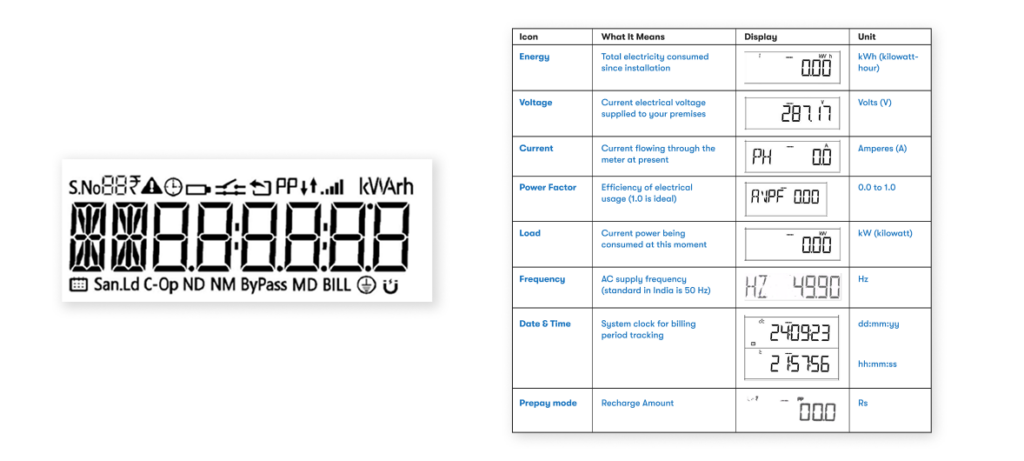
The display typically cycles through information such as:
Learn more: What is Smart Meter Reading? How It Works, Benefits & AMI Explained (2026 Guide)
1. Energy (kWh)
This is the most important reading on your smart meter. It shows the total electricity consumed by your premises. The reading appears in kilowatt-hours (kWh), commonly known as units of electricity. Every appliance you use contributes to this number.
For example, running a fan, watching television, using an air conditioner, charging electronic devices, all add to your total energy consumption. Think of this reading like the odometer in a car. An odometer records the total distance travelled. Your energy reading shows the total electricity consumed.
2. Voltage (V)
Voltage shows the electrical pressure available at your premises. It is measured in volts (V). A stable voltage supply helps electrical appliances operate efficiently.
3. Current (A)
Current shows how much electricity is flowing through the meter at a particular moment. It is measured in amperes (A). When more appliances run at the same time, the current generally increases. For example, if you switch on an air conditioner, geyser, and microwave together, the current reading may rise compared to normal household usage.
4. Load (kW)
Load represents the amount of power your home or business consumes at that moment. It is measured in kilowatts (kW). This reading helps you understand how much electricity your appliances use right now. For example:
This reading is useful when identifying periods of higher electricity usage.
5. Power Factor
Power factor indicates how efficiently electricity is being used. The value typically ranges from 0 to 1. A value closer to 1 indicates efficient usage. A higher power factor means more of the supplied electricity contributes to useful work.
6. Frequency (Hz)
Frequency shows how often the alternating current changes direction every second. It is measured in hertz (Hz). India’s electricity grid operates at approximately 50 Hz. Small variations are normal. For most residential consumers, this reading serves as an informational parameter.
7. Prepaid Balance
If you use a prepaid smart meter, the display may show the available recharge balance in rupees. This helps end-users track available balance, plan recharges and monitor electricity usage between recharges.
Learn more: How to Recharge Your Smart Meter Online and Offline in India (2026 Guide)
8. Date and Time
Smart meters maintain an internal clock that records the date and time. Utilities use this information for billing and energy tracking. This becomes especially useful in areas that use time-based electricity tariffs.
Learn more: Smart Meter vs Traditional Meter: Key Differences Explained (2026 Guide)
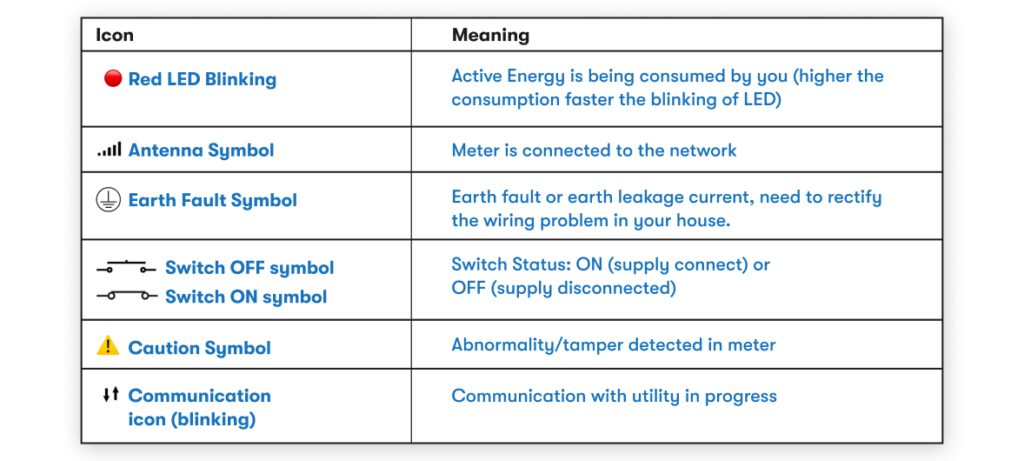
Smart meters use symbols to communicate important information quickly:
Red LED Blinking
The blinking red LED indicates electricity consumption. The faster the blinking, the higher the electricity usage at that moment. For example, you may notice faster blinking when multiple high-power appliances operate simultaneously.
Network Signal Icon (Antenna Symbol)
This symbol indicates that the meter is connected to the communication network. The connection allows the meter to securely exchange information with the utility.
Communication Icon
A blinking communication icon indicates that the meter is exchanging information with the utility system. This process supports remote meter reading and system updates.
Supply Status Symbol
This icon shows whether electricity supply is currently connected through the meter. Consumers may see this icon during prepaid balance updates, reconnection activities, or utility operations.
Earth Fault Symbol
This symbol indicates earth leakage current or an earthing-related issue within the electrical installation. A qualified electrician can help inspect the wiring and resolve the issue.
Caution Symbol
The caution symbol indicates that the meter has detected an abnormal condition or tamper detection that may require attention. If this symbol remains visible for an extended period, contact your electricity distribution company for guidance.
Track Your Daily Usage
Track your daily Check the energy reading at the same time every day. This simple habit helps you understand how quickly electricity consumption changes.
Monitor High-Consumption Appliances
Observe the load reading before and after switching on appliances such as:
You can quickly identify which appliances consume more electricity.
Learn more: 1 Unit Electricity Cost in India (2026): State-Wise Tariff & Bill Calculation Guide
Meter Shows Supply Disconnected
The meter may display a disconnected supply status when the internal load switch is open. Utilities may perform this action for operational or billing-related reasons. If you see this status, check your consumer account and contact your electricity distribution company for assistance.
Display Is Continuously Scrolling
This is normal behaviour. Most smart meters automatically cycle through multiple parameters every few seconds.
Display Button Is Not Responding
Wait for the display cycle to complete and try again. If the issue continues, contact your utility’s customer support team.
Your smart meter display provides important information at a glance, but many electricity utilities also offer mobile apps and online consumer portals that make it even easier to track and manage electricity usage.
Depending on your utility app, you may be able to:
A smart meter gives you a clearer picture of how electricity is being used in your home and helps you make informed energy decisions. Smart meters make electricity management more convenient, transparent, and consumer friendly.
Your smart meter does much more than record electricity consumption. It acts as a window into your home’s energy usage.
Once you understand what the readings and symbols mean, you can track consumption more effectively, monitor prepaid balance, identify unusual conditions, and make smarter energy decisions.
The next time you walk past your smart meter, take a moment to look at the display. Those numbers and symbols tell the story of how electricity flows through your home every day. To conclude,
Smart Meter Display + Mobile App → Better Energy Awareness → Smarter Energy Decisions
Learn more about Kimbal’s range of Smart Meters
What is the most important reading on a smart meter?
The energy reading measured in kWh is the most important parameter because it represents the electricity consumed and forms the basis for billing.
What does kWh mean?
A kilowatt-hour (kWh) is one unit of electricity. It measures how much electrical energy has been consumed.
Learn more: What is a “Unit” in Electricity? Meaning, kWh Calculation & Electricity Bill Guide
Why does the red light on my smart meter blink?
The red LED blinks whenever electricity is being consumed. Faster blinking generally indicates higher electricity usage.
Why does my smart meter display keep changing?
The meter automatically scrolls through different readings such as energy, voltage, current, load, and balance information.
Does a smart meter use my home’s Wi-Fi?
Most smart meters communicate using dedicated communication networks provided by the utility and do not require household Wi-Fi.
Can I check my prepaid balance on the meter?
Yes. Prepaid smart meters can display available recharge balance directly on the screen.
Learn more: How to Recharge Your Smart Meter Online and Offline in India (2026 Guide)
How accurate are smart meters?
Smart meters are designed to measure electricity consumption accurately and comply with applicable metering standards.
Can a smart meter help me reduce electricity consumption?
Yes. The display provides visibility into electricity usage patterns, which helps consumers make informed decisions about energy consumption.
Does a smart meter show electricity usage in real time?
Smart meters display parameters such as current, voltage, and load, allowing consumers to understand electricity usage at a particular moment.
How do I read my smart meter?
Press the display button on the meter to scroll through different screens. The most important reading is the energy consumption value displayed in kWh, which shows the total electricity used by your premises.
What do the numbers on my smart meter mean?
The numbers represent different electrical parameters such as – energy consumed (kWh), voltage (V), current (A), load (kW), power factor, frequency (Hz), and prepaid balance (for prepaid meters). Each reading provides information about your electricity usage and supply conditions.
Which reading should I check for my electricity bill?
The energy reading displayed in kWh is the most important value. This represents the total number of electricity units consumed and forms the basis of your electricity bill.
What is a unit of electricity?
One unit of electricity equals one kilowatt-hour (kWh). For example, a 1,000-watt appliance running for one hour consumes one unit of electricity.
Learn more: What is a “Unit” in Electricity? Meaning, kWh Calculation & Electricity Bill Guide
Why does my smart meter display keep changing automatically?
Smart meters operate in auto-scroll mode and cycle through different parameters every few seconds. This allows consumers to view multiple readings without pressing any buttons.
Why is the red light on my smart meter blinking?
The blinking red LED indicates that electricity is being consumed. A faster blinking rate usually means higher electricity consumption at that moment.
What does the network signal icon mean?
The network signal icon shows that the meter is connected to the utility’s communication network and can exchange data remotely.
What does the communication symbol on my meter mean?
The communication icon indicates that the smart meter is sending or receiving information from the electricity utility. This process supports remote meter reading and system updates.
What does the earth fault symbol mean?
The earth fault symbol indicates an earthing-related issue or earth leakage current in the electrical installation. A qualified electrician can inspect the wiring and identify the source of the issue.
What does the caution symbol mean on a smart meter?
The caution symbol indicates that the meter has detected an abnormal condition that may require attention. Contact your electricity distribution company if the symbol remains visible.
Can I check my electricity usage in real time?
Yes. Smart meters display parameters such as current (A) and load (kW), which help consumers understand electricity usage at a particular moment.
How can I check my prepaid balance on a smart meter?
Prepaid smart meters display the available balance directly on the screen. Press the display button if required to navigate to the balance screen.
What happens when my prepaid balance reaches zero?
The meter may disconnect electricity supply once the available balance is exhausted, depending on utility policies and settings. Consumers should recharge before the balance runs low.
Does a smart meter work without Wi-Fi?
Yes. Smart meters typically communicate through dedicated RF Mesh, cellular, or utility communication networks and do not require household Wi-Fi.
Can a smart meter help me reduce my electricity bill?
Yes, by providing visibility into electricity consumption patterns, smart meters help consumers identify high-usage periods and make informed energy-saving decisions.
How often does a smart meter send readings?
The frequency depends on utility requirements and communication settings. Smart meters can transmit data automatically without requiring manual meter readings.
Are smart meter readings accurate?
Yes, smart meters are designed to measure electricity consumption accurately and undergo rigorous testing and certification before deployment. Kimbal residential smart meters comply with key Indian metering standards, including: IS 16444 Part 1, IS 13779, IS 15959 Part 2 and IS 15884
These standards define requirements for measurement accuracy, reliability, safety, communication, and performance under various operating conditions. Compliance with these standards helps ensure that smart meters accurately record electricity consumption and support fair and transparent billing for consumers.
Can a smart meter detect power outages?
Yes, smart meters can identify supply interruptions and communicate outage-related information to the utility.
Will my smart meter continue to record readings during a power cut?
The meter securely stores consumption data. Once power is restored, normal operation resumes and the recorded information remains available.
Can I monitor my daily electricity consumption using a smart meter?
Yes, by checking the energy reading at the same time every day, you can estimate daily electricity consumption and track changes over time.
What is voltage on a smart meter?
Voltage represents the electrical pressure supplied to your premises and is measured in volts (V).
What is current on a smart meter?
Current measures the flow of electricity through the meter and is displayed in amperes (A).
What is load on a smart meter?
Load represents the amount of power being used at a particular moment and is displayed in kilowatts (kW).
What is power factor on a smart meter?
Power factor measures how efficiently electricity is being used. A value closer to 1 indicates better efficiency.
Do smart meters need manual meter reading?
No, smart meters automatically transmit consumption data to the electricity utility, eliminating the need for routine manual meter readings.
What should I do if my smart meter is showing an error or warning symbol?
If your smart meter displays a caution symbol, error message, or any unusual indicator, note down the details shown on the screen and contact your electricity utility for guidance. You can also call 1912, the national electricity consumer helpline, for support with electricity-related complaints and service requests.
Can I see my previous month’s consumption on the smart meter?
The information available on the display depends on the meter configuration and utility settings. Many consumers can also access historical consumption data through utility mobile apps or consumer portals.
Is my smart meter safe to use?
Yes, smart meters are designed and tested according to established safety and performance standards before deployment.
Why should I learn to read my smart meter?
Understanding your smart meter helps you:
Who should I contact if I have a complaint or issue with my smart meter?
For issues related to your electricity connection, smart meter readings, billing, prepaid balance, supply interruptions, or service requests, you can contact your electricity distribution company (DISCOM).
You can also call 1912, the national electricity consumer helpline number available across India, to register electricity-related complaints or seek assistance. The helpline can help connect you with the relevant electricity utility for your area.
Published on 13 October 2026
Published on 7 October 2026

Published on 6 October 2026
Your email address will not be published. Required fields are marked *